
In Second Life (SL), items have an inventory in much the same was as your avatar has.
You may add items to any rezzed object to which you have modify privileges or which has enabled ALLOW_INENTORY_DROP. However, if you are new to SL, this can be a little tricky. There are three different ways in which a user (you) may drop an item into another. The one I will show you is using the object editor.
For this example, I will drop a basket of eggies, er, I mean Cesta de huevos into Lady Bri’s eggie basket. I will further assume that the item you wish to drop, Cesta de huevos, is in your inventory, so first you will want to open your inventory window. Press Ctrl–I to open the window, and then find your huevos. Next you must edit the object where you wish to deposit the item. To edit an object, right click on it, and select EDIT in the pie menu. See how the basket has a yellow glow? Then select the tab labeled Content (1). Finally, drag the item from your inventory into the content panel. To do this, hover the mouse over Cesta de huevos in inventory (2), press and hold the left mouse button, move the cursor to the content panel (3) and then release the mouse button. Notice the shape of the cursor while you are dragging. That’s it!
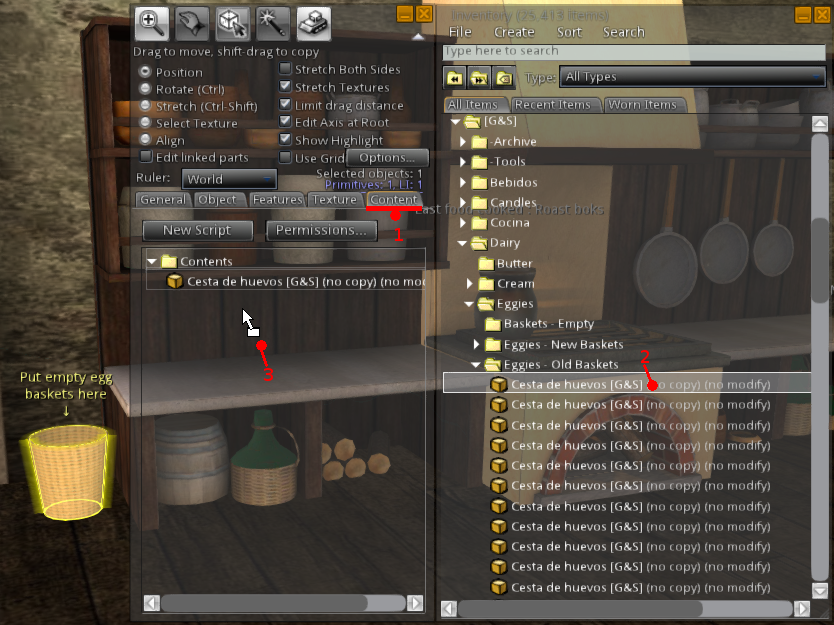
Example of Dropping using Edit
It is also sometimes possible (if the rezzed object is not empty) to select OPEN from the pie menu and the drag and drop just like above. Yet another way is to simply drag an item from your inventory and drop it onto the prim while holding down your Ctrl key. If you’ve got everything right, then just before you release it, you will see the prim framed in red. And if you get it wrong, it will drop inside the floor or rez in some mysterious place.